Showing posts with label ROMS: R-BOX Pro. Show all posts

Thursday, September 21, 2017

Dead R-Box Pro?


Im back everyone. 

This update I'm going to talk about my most recent experience with the R-Box Pro android set top box. In the past I've discussed some of the shortfalls with the RBP's initial firmware, and how updating to newer firmware solved a great deal of problems. While the update was a vast improvement over the originally shipped firmware, the RBP still wasn't without it's issues. 

The most notable problem was inconsistent internet speeds when hardwired to my gigabit home network. What I noticed as strange with the RBP is that it would seem to drop internet signal once the cache was full, so when watching TV shows or Movies once the cache portion was played it would start to buffer and seem to no longer buffer to cache. With a machine that had 3GB of ram, you would assume buffering would never happen but it actually buffered more than my 1GB OUYA. Playing around with advanced settings helped a bit at times, but this was always an ongoing problem.

Crashing, the RBP was always crashing out of Kodi. It wouldn't take much to crash, simply moving through the menu was enough for it to crash. 

Overheating, or at least running hot, was possibly the root of the above mentioned issues. My RBP was always showing an operating temperature of somewhere in the 170+ degrees Celsius. No matter how cool the ambient temperature was the RBP always ran hot. (I even installed a 120mm usb fan underneath to reduce temperatures).

So those were the issues plaguing my RBP, and then one day while surfing youtube videos, the machine just froze. I unplugged the unit, waited a few seconds and powered it back up. Once back into youtube, the RBP then froze up again, this time rebooting itself in the process. On the third boot up the main menu appeared and then RBP turned itself off. This would be the last time the RBP was functional. Repeated rebooting never managed to get past the initial boot logo (not even the sound played). 

In an attempt to fix this situation, I began to re-flash the firmware, but unlike my previous experience with firmware flashing, this time the flashing stopped after a few seconds and did not continue.

I'm sure my device was bricked!

I contacted Geekbuying, as I had purchased the unit from them, and inquired about some sort of resolution to my problem. I explained how unsatisfied I had been with the units I had purchased, and their response was that I should have returned them right away, and that since the units were 10 months old and under their warranty, all they could do is have them repaired. Geekbuying was willing to repair my RBP, however I needed to send the unit back to them with a tracking number. Well the cost of sending the packaged RBP back to Geekbuying is $9 Canadian, but with tracking that same package then becomes $50 Canadian. 
WTF!!!!

I could buy a cheaper more reliable replacement unit directly from Amazon, for less money then sending my unit back for repairs.

Geekbuying refused to offer me any more assistance on this issue, so they are now officially on my shit list of companies for whom I refuse to do business with. As far as I'm concerned Geekbuying,  can continue to pedal their crappy wares, I wont be supporting them, nor will I be referring customers to them.

So I'm stuck with a piece of shit RBP paperweight. 

But hold on, I'm not going to give up that easily. I've read enough forum posts to know that there were some people out there who have claimed a godlike ability to revived bricked devices. This process consisted of manually erasing the ram chips (which involves shorting out some pins while the machine was on). So I'm going to research this a bit and possibly have a follow up post.

If anyone wants to donate a new android set top box for me to use, I would greatly appreciate it.


Thursday, April 6, 2017

ROM: R-BOX Pro (Update)

This is a small update to the previous R-Box Pro post detailing how to upgrade the stock firmware to a newer version. I managed to stumble upon a forum discussion on freaktab.com that detailed how someone (alienpearl) managed to manipulate (hack/mod) the firmware for the R-Box Pro to run Android TV.  The post is here.
(this is not an image of the R-Box Pro's Android TV, just a version of Android TV)

Having successfully flashed this rom to my R-Box pro, I can honestly say that it works, and works quite well. It was a rather different experience than the normal android tablet/phone environment, and it accepted my webcam without any problems. While it was a new refreshing look, at what could be an alternative for android boxes, it was a bit primitive for my mainstream use. I could however see how this O/S implementation could convert the more non tech savvy, as it was quite simple.  

If you want to give this a try, follow my previous post on flashing the R-Box Pro, and substitute the new android tv rom image file instead of the firmware update image file. You can get the android tv rom from the forum mentioned above or directly from here.


Wednesday, February 8, 2017

ROM: R-BOX Pro

Before we dive in on updating the firmware of the R-BOX Pro, I wanted to give a little review (or maybe it's an insight into why I'm upgrading the firmware of my R-BOX Pro).

I purchased the R-BOX Pro, thinking that a new Octo-core (8 Core cpu) would vastly improve my TV viewing experience over my aging Quad-core (4 core cpu) OUYA game console/TV set-top box. In fact on paper the R-BOX Pro outperforms almost all existing android TV Set-top boxes on the market, with the exception of the NVIDIA Shield. With a price of $74 U.S. dollars it's quite inexpensive, seeing as 4 years ago I paid $125 U.S. dollars for my OUYA.

I've been using my new R-BOX Pro for a few months now, and it kinda sucks. While it has impressive hardware specifications, it just doesn't seem to deliver. The interface is nice and fluid, and the remote is cool (it has programmable buttons which can eliminate the need for your TV remote). However, it glitches, shows green flashes at random times, runs KODI quite poorly, and the remote mouse function is horrible (they really should have incorporated an air mouse).

With such great hardware specifications, I was expecting a far superior product. But as with the case of many phones, tablets, and set-top boxes, I turned to the online community for some consoling. This time it would appear the online community I've grown to love and admire, just weren't there for me. In fact it seems that no one in the android extended family of tinkerers wants anything to do with Amlogic s912 processors. Which is strange since it's predecessor the Amlogic s905 has all kinds of support.

Now I need to be honest with you, I tried several times to flash the suggested update R-BOX Pro firmware provided by my retailer, but after about 30 hours of failed attempts I had almost given up hope. Yes, that's right, I spent about 30 hours trying flash the R-BOX Pro, and I just couldn't figure it out. Just for the record I'm no newbie to flashing, while I'm no NASA engineer either, I've been flashing hardware since the 2x CD Recording days when you had to flash regular CD Recorders to copy PlayStation games. I've flashed game consoles, smart phones, tablets, set-top boxes, even bricked devices using JTAG, but the R-BOX Pro had me stumped.

Then almost as if it were divine intervention, I read a few random posts and started putting the puzzle pieces together. Firstly there are apparently two models of R-BOX Pro one model that sports a q9377 processor, and a q6330 processor. I had been trying to flash my q6330 R-BOX Pro with the vendors firmware, which I later discovered was for the q9377 R-BOX Pro firmware, and of course it wasn't working.

Once I realized that I had the q6330 model of R-BOX Pro, I was finally able to upgrade my device using the following steps.

Getting The Firmware
  1. Press and hold down the reset button (usually takes 15 seconds). After 5 seconds you will see the R-BOX Pro logo, when the logo disappears you can release the rest button.
  2. You will now be in boot-loader mode. You will see the title Android Recovery Mode.
  3. The second and third line after the title will indicate which processor you have and which firmware you are currently running (I suggest you write this down, mine reads amlogic/q6330/q6330 followed by 6.0.1/MHC19J/2016-09-18).
  4. If you own a q6330 model R-BOX Pro, you can get new firmware here, if you own the q9377 then do a web search, you should be able to track down upgrade firmware quite easily.
Preparing Your SC Card In Windows
Much of the information below was derived from CNXSoft-Embedded System News, which also has procedures for preparing an SD card in Linux, It's a great site with tons of information.
  1. Your going to need an SD Card, probably larger than 1GB as the firmware is 1GB in size.
  2. Download the Amlogic SD card maker program from here.
  3. When you run the Amlogic SD Card Maker software, you will see this screen.

  4. Clicking the top menu item, will drop down three choices select the second option, the the option for English will appear. Close the program and restart it, you will now see this screen.


  5. Make sure your software looks like the above image, obviously you will choose you sd card location, and the image file you want to flash. Click make and you will see a screen similar to this.


  6. Make sure you select FAT32 for file system and 32 kilobyte for allocation unit size. When preparing my SD card, this step was crucial in getting the R-BOX Pro to recognize my SD card.
  7. Once the SD card has been properly formatted, you can close the box, and the following screen will emerge.


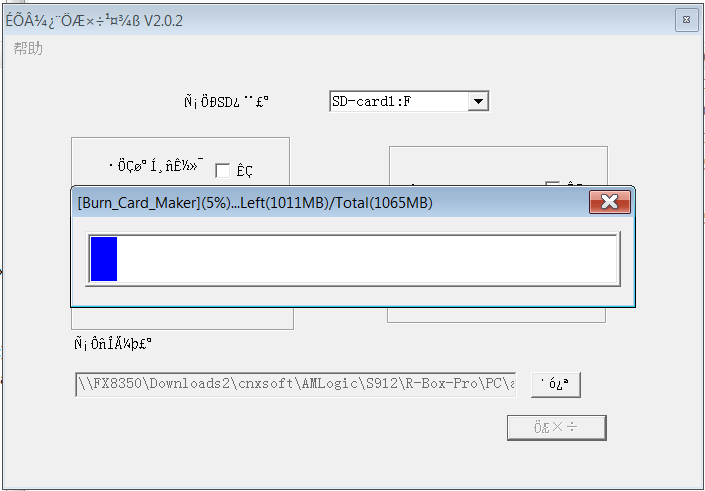
  8. It will take some time to transfer the image to SD card, which is normal.
Flashing The R-BOX Pro
  1. Insert your newly created SD card into the R-Box Pro, and hold down the reset button for about 5 seconds. You will now see the android mascot followed by the words upgrading and a progress bar. 
  2. This will take a few minutes to complete, and it will then reboot.
  3. The reboot after upgrading is going to take a while, close to 10-15 minutes, so be prepared to wait.
I haven't fully run my R-BOX Pro through its paces, but on initial observation, it seems to run much better. I still wouldn't recommend it to friends, but at least now it should be usable and stable. Thanks for reading and if you have a chance check out CNXSoft-Embedded System News.

Dear Retailers, (Part 2: Self Serve)

  Self-scan, U-scan, Scan N Go, whatever they want to call it, it's basically self serve. (Full Disclosure: I may be somewhat bias when ...